


What Is a Wedding Photo Gallery? Your 2026 Guide
A wedding photo gallery is a digital platform that stores, organizes, and shares photos and videos from your wedding day. It serves two distinct purposes: delivering professionally edited images from your photographer, and collecting candid shots contributed by your guests. Modern galleries run entirely in the browser, require no app downloads, and give everyone access through a simple QR code scan.
Here is what a wedding photo gallery typically includes:
- A private, password-protected or link-based space for your wedding photo collection
- Original-quality uploads from both the photographer and guests
- Organization by event, moment, or timeline
- Sharing options via QR code, direct link, or email
- Download access for full-resolution files
- Storage windows ranging from several months to multiple years
What is a wedding photo gallery and how does it work?
The core function is straightforward. Your photographer uploads edited images to a dedicated online gallery, and you receive a private link or QR code to access everything. Guest-focused galleries extend that concept by letting attendees upload their own photos and videos from the same event, creating one centralized wedding photo collection instead of dozens of scattered phone albums.
What separates a modern gallery from a simple shared folder is the experience built around it. Browser-based uploads mean guests never touch an app store. They scan a QR code, select their photos, and upload directly from their phone camera roll. The whole process takes under a minute, which matters when you want spontaneous moments captured before the night ends.
Organization is where galleries earn their value. Rather than receiving a single folder of hundreds of images, you get photos sorted by ceremony, cocktail hour, reception, and portraits. Some platforms let you mark favorites directly in the gallery, eliminating back-and-forth emails with your photographer about album selections.
How online wedding photo galleries operate
The workflow follows a consistent pattern across most platforms. Your photographer or you set up the gallery before the event, generate a QR code, and display it on place cards, signage, or your wedding website. Guests scan it at any point during the day and upload directly from their browser.
Guest uploads appear in the gallery in real time. Removing technical barriers like app downloads and account creation is the single biggest factor in how many photos you actually collect. Platforms that require a sign-up tend to see lower participation, especially among older guests who are less comfortable with new apps.
- QR code access: Guests scan with their phone camera, no additional steps required
- Browser uploads: Photos and videos go straight to your gallery without any software installation
- Live gallery updates: New uploads appear instantly, sometimes displayed on a reception screen
- Original quality: Files land in full resolution, not compressed versions
Pro Tip: When evaluating platforms, test the upload flow yourself on a basic smartphone before your wedding. If it takes more than 30 seconds from scan to upload confirmation, your guests will likely skip it.
Types of wedding galleries and popular platforms in 2026
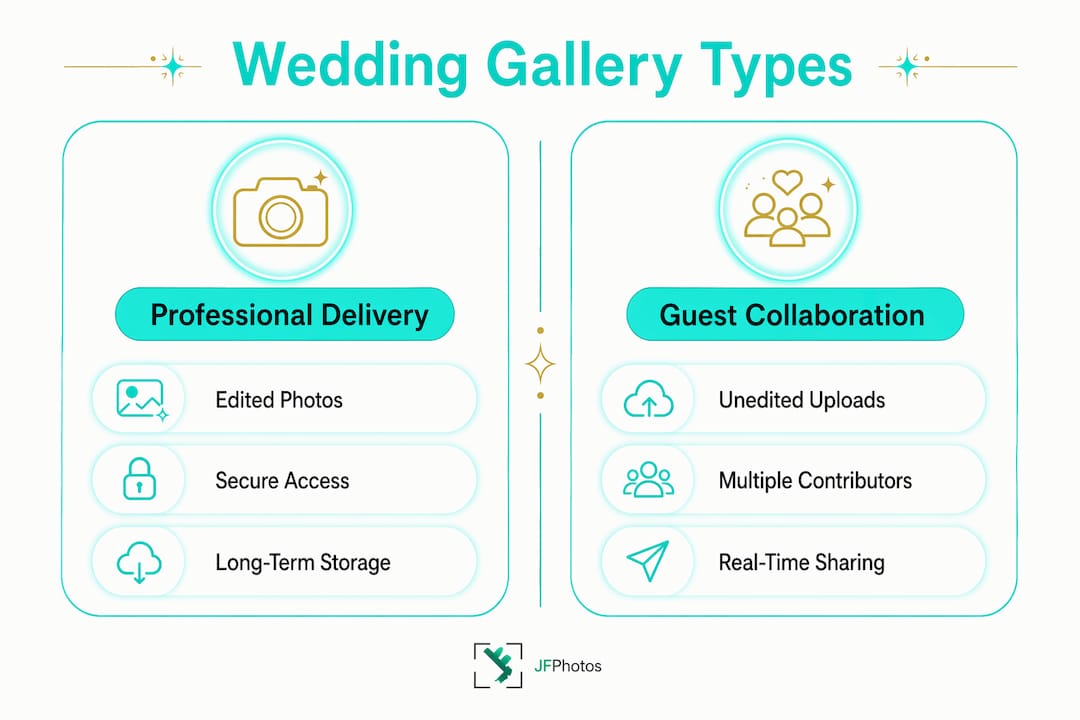
Wedding photo galleries split into two broad categories: professional delivery galleries and guest collaboration galleries. Many couples use both.
Professional delivery galleries are where your hired photographer delivers edited work. Platforms in this category focus on presentation quality, client proofing tools, and print sales. Pic-Time, for example, includes AI-driven face and object search so you can type “first kiss” or “red shoes” and locate specific moments instantly across hundreds of images. Pixieset prioritizes a clean, editorial aesthetic optimized for mobile viewing, which matters when a significant portion of your guests browse on their phones.
Guest collaboration galleries are built around participation. The goal is collecting every candid moment your photographer could not be in two places to capture.
Here are the standout platforms for guest-focused sharing in 2026:
- GuestCam: App-free QR uploads with a 12-month upload window and 14-month storage. Supports sub-galleries for rehearsal dinners, ceremonies, receptions, and day-after brunches under one purchase, each with its own QR code. No file size caps on video.
- Wedbox: One-time payment model. Guests scan a QR code and upload from their browser with no login required. Includes audio guestbook messages, a live slideshow, and unlimited albums for organizing uploads on paid tiers.
- Honcho: Solves a different problem entirely. Your photographer’s camera uploads images to the cloud as they shoot, and guests can see professional shots appearing in a shared gallery during the reception, sometimes before they have even sat down for dinner. A live slideshow streams those images to a screen, and face recognition lets guests find photos they appear in by uploading a selfie.
- WedUploader: Focused on simplicity. Guests get a shareable link and QR code, upload from any browser, and the gallery builds itself in real time without requiring any account creation.
A few features worth comparing when planning a wedding photo gallery:
| Feature | Why it matters |
|---|---|
| Upload window length | Guests upload sporadically for months after the event |
| Storage duration | Galleries often expire after 6–12 months without a recurring fee |
| Video support | Check file size limits and time caps on lower pricing tiers |
| Multi-event organization | Essential for wedding weekends spanning multiple events |
| AI search | Reduces time spent scrolling through large photo collections |
How to access, share, and use your gallery effectively
Accessing your gallery starts before the wedding day. Print the QR code on place cards, ceremony programs, or a small sign near the guest book. Couples who display the code in multiple locations consistently collect more photos than those who share it only via a single text message.
Once the gallery is live, sharing with family and friends is straightforward:
- Send the private link via text, email, or your wedding website
- Download full-resolution files as a ZIP archive for permanent backup
- Apply the 3-2-1 backup rule: keep three copies of your photos, on two different media types, with one copy stored off-site (your cloud gallery serves as that off-site copy)
- Continue contributing after the event: guest upload windows on quality platforms stay open for at least six months, capturing photos guests find weeks later
- Manage multi-event galleries by assigning separate QR codes to each event so uploads stay organized by occasion
One practical step many couples overlook: download your full-resolution images immediately upon delivery. Most professional galleries expire after 6–12 months unless you or your photographer pays a recurring storage fee. Do not assume the gallery will be there a year from now.
Pro Tip: Look for platforms offering at least a 12-month upload window and 14 months of storage access. That timeline covers professional photo delivery, which typically arrives 6–12 weeks after the wedding, plus months of guest contributions.
For wedding photography packages that include gallery delivery, ask your photographer specifically which platform they use, how long the gallery stays active, and whether you receive the original files or compressed versions.
How galleries have evolved into storytelling tools
The role of a wedding photo gallery has shifted well beyond simple storage. Professional photographers and wedding planners increasingly treat the gallery as a narrative tool, one that combines polished edited images with raw, candid guest perspectives to tell the full story of the day.
Your photographer captures the ceremony, the portraits, and the key moments with artistic precision. Your guests capture everything else: the tearful reaction from a parent in the third row, the spontaneous dance floor moment at 11 PM, the quiet conversation between old friends at the cocktail hour. Neither set of images tells the complete story alone.
A few expert-backed practices that improve the gallery experience:
- Organize by moment, not just chronology. Folders labeled “Ceremony,” “Cocktail Hour,” and “Reception” help guests and family navigate without scrolling through hundreds of images at once.
- Use AI search to fight gallery fatigue. Platforms with face recognition let guests find every photo they appear in by uploading a single selfie, which is far more practical than scrolling through a large collection.
- Curate professionally delivered images. A curated gallery of 500 stunning photos delivers more value than thousands of repetitive shots. Quality over volume applies directly to how couples actually use and revisit their galleries.
- Prioritize privacy controls. Your gallery contains personal moments shared with a specific group of people. Look for platforms with private access via QR code or link only, moderation tools, and the ability to delete content at any time.
Gallery organization by moment also reduces the cognitive load of browsing, which directly affects how often couples and family members return to relive the day. A well-organized gallery gets revisited. A disorganized one gets downloaded once and forgotten.
The best galleries in 2026 function as living archives. They accept original-quality photos and videos, support live slideshows during the reception, include voice messages from guests, and stay accessible long after the wedding weekend ends. When you work with a professional wedding photographer who delivers through a quality platform, the gallery becomes the primary way your wedding story gets told and retold for years.
Key Takeaways
A wedding photo gallery serves as both a professional delivery platform and a guest collaboration hub, and choosing the right one directly affects how completely your wedding day is documented.
| Point | Details |
|---|---|
| Two gallery types | Professional delivery galleries focus on curated images; guest galleries collect candid contributions from attendees. |
| Remove upload barriers | App-free, browser-based QR uploads maximize guest participation and capture spontaneous moments. |
| Download files promptly | Most professional galleries expire after 6–12 months; download full-resolution images immediately upon delivery. |
| Organize by moment | Folders by event or moment reduce gallery fatigue and make large photo collections easier to navigate. |
| Storage window matters | Look for platforms offering at least a 12-month upload window and 14 months of storage to cover delayed professional delivery and ongoing guest contributions. |
Recommended
Recent Posts