

How to Brief Employees Before Headshot Day: HR Checklist
Send a clearly labeled prep email one week before the session and a short reminder the morning of the shoot. That single action, done well, accounts for most of what separates a smooth headshot day from a chaotic one. According to JFPhotos’ corporate headshot preparation guide, the one-week message should include the employee’s scheduled time slot, the room location, wardrobe guidance, and check-in instructions. The morning-of reminder keeps it to three lines: where to go, when to arrive, and what to bring.
Here is what to put in that first email, in a format employees can skim in under 30 seconds:
- Your time slot: [Date], [Start Time] (plan for a few minutes in the chair)
- Location: [Room name/floor], check in with [Point Person Name]
- What to wear: Solid colors in navy, charcoal, burgundy, or forest green; dress one level above your daily attire; avoid small patterns, visible logos, and neon
- Grooming: Fresh haircut if possible, minimal matte makeup, bring a small touch-up kit (powder, comb, lip balm)
- What to bring: Any approved accessories; leave bulky bags at your desk
- Coaching: The photographer will guide your pose and expression — no experience needed
The ASMP sets the professional standard for corporate portrait sessions, and the practices in this guide align with those benchmarks.
Key Takeaways
Briefing employees before headshot day requires a one-week prep email with wardrobe and slot details, a clear day-of schedule with buffers, a dedicated point person, and confirmed deliverables from the photographer.
| Point | Details |
|---|---|
| Send two communications | A detailed prep email one week out and a short reminder the morning of the session. |
| Build a tight schedule | Assign 7–10 minute fixed slots with 5-minute buffers after every three to four employees. |
| Assign a point person | One internal coordinator handles check-in, the queue, and no-show tracking so the photographer stays focused. |
| Confirm deliverables in writing | Agree on file types, retouching scope, turnaround time, and usage rights before the shoot date. |
| JFPhotos for on-site sessions | JFPhotos provides coordinated on-site headshot services with uniform retouching and fast delivery for teams of all sizes. |
Table of Contents
- How to brief employees before headshot day: planning and logistics
- How do you assign time slots and build a realistic schedule?
- What should employees wear on headshot day?
- Grooming checklist and retouching expectations
- What does the day-of workflow look like?
- Simple posing cues to share with employees ahead of time
- What to confirm with the photographer before the shoot
- Ready-to-use email templates and HR checklist
- How are final images selected, edited, and delivered?
- Most common headshot day mistakes and how to fix them fast
- Electronic device and personal item policies during the session
- Contingency plans for absentees and rescheduling
- What actually makes a headshot day succeed
- JFPhotos brings professional headshots directly to your team
- Sources
How to brief employees before headshot day: planning and logistics
Start planning several weeks out for larger teams. For smaller groups, a shorter runway can work, but you still need enough time to send the prep email and collect scheduling conflicts.
Before you send a single invite, confirm these logistics:
- Reserve the room. You need a clear space of at least 8x10 feet for the shooting area, plus a separate staging or waiting area nearby. The staging area is where employees queue, do last-minute touch-ups, and wait their turn without crowding the set.
- Check power and quiet. The photographer needs reliable power for lighting equipment. Avoid rooms adjacent to loud HVAC units, open kitchens, or high-traffic hallways.
- Assign one internal point person. This is not the photographer. It is a staff member, ideally you or a trusted coordinator, whose only job that day is to greet employees, confirm their slot, direct them to the staging area, and keep the queue moving. The JFPhotos team photo best practices guide identifies this role as the single biggest factor in keeping a session on schedule.
- Confirm the photographer’s arrival window. The photographer should arrive 60–90 minutes before the first scheduled subject to set up lighting, test the background, and troubleshoot any equipment issues.
Pro Tip: Walk the room yourself before the photographer arrives. Check for distracting wall art, cluttered shelves in the background, and overhead fluorescent lights that conflict with studio lighting. A five-minute walk-through prevents a 30-minute fix on shoot day.
How do you assign time slots and build a realistic schedule?
Vague scheduling is one of the most common reasons headshot days run late. Sending a general announcement (“come by between 10 AM and noon”) produces low compliance and unprepared employees. Assign specific calendar invites with fixed start times instead.
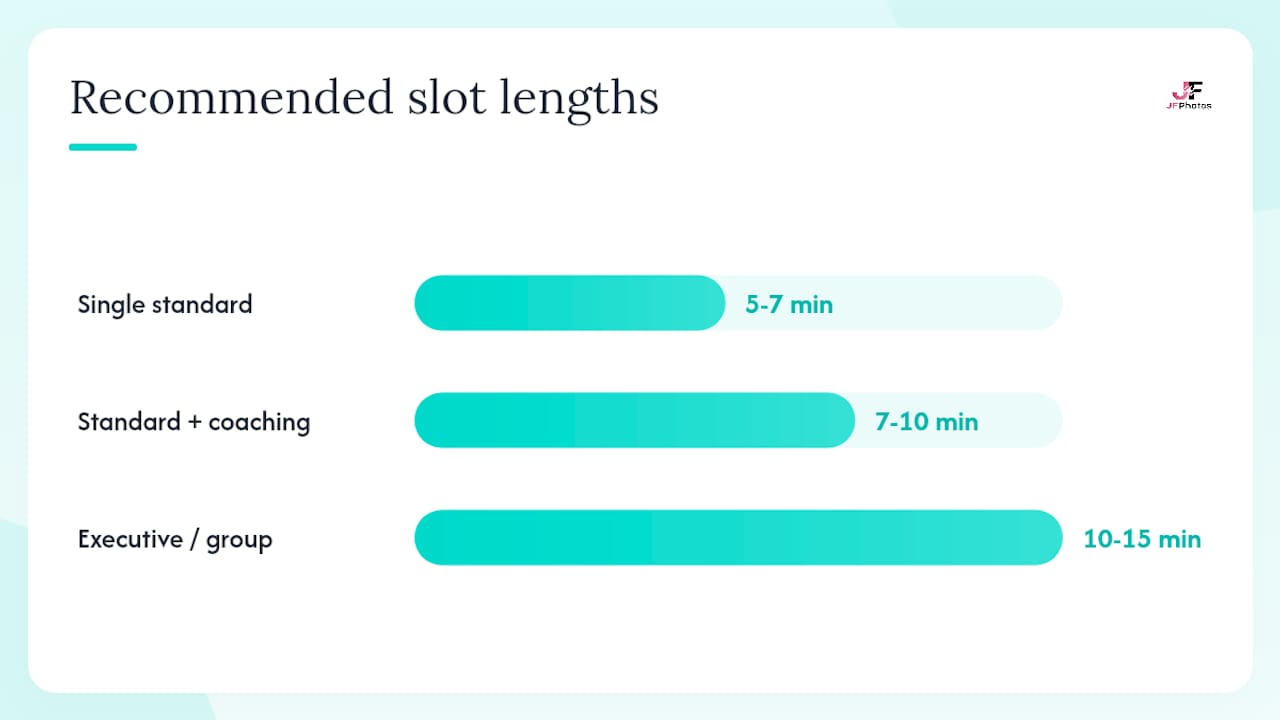
Recommended time per person:
- 5–7 minutes for a single standard headshot with no wardrobe change
- 7–10 minutes for standard headshots with brief expression coaching
- 10–15 minutes for executives, multiple looks, or group shots
Build a 5-minute buffer after every third or fourth slot to absorb late arrivals and minor delays. Schedule group shots at the end of the session, not the beginning, so individual timing overruns do not cascade into a group delay.
Sample schedules:
Common pitfalls to avoid: scheduling during peak work hours (9–10 AM on Mondays, end-of-quarter crunch days), giving employees a window instead of a fixed slot, and forgetting to block time for the photographer’s setup and breakdown.
What should employees wear on headshot day?
Wardrobe is the variable HR controls most directly. A clear, specific dress code in the prep email eliminates the most common photo problems before the session starts. For detailed wardrobe guidance you can excerpt directly into your employee email, the JFPhotos wardrobe guide for professional headshots covers color, fit, and accessory recommendations.
Wear:
- Solid colors: navy, charcoal, burgundy, forest green, medium blue, or slate gray
- One level above daily attire (business casual becomes business professional; casual becomes business casual)
- Well-fitted clothing, not baggy or overly tight
- Simple accessories: a watch, small earrings, a subtle necklace
Avoid:
- Small repeating patterns (checks, herringbone, fine stripes) — these create a moiré effect on camera
- Visible brand logos or graphic text
- Neon or very bright colors, which reflect onto skin under studio lighting
- Pure white shirts or blouses directly against a white or light background
- Bulky scarves, oversized jewelry, or anything that draws the eye away from the face
A note on branded clothing: if your company uses branded polo shirts or jackets for some roles, confirm with the photographer whether those pieces work against the chosen background; in many cases, a solid-color alternative photographs better and looks more polished.
Grooming checklist and retouching expectations
Employees do not need a professional blowout or a makeup artist. They need to arrive tidy, rested, and with a small touch-up kit. Here is the checklist to share:
- Hair: Get a fresh cut 5–7 days before the shoot (not the day before, which can look too sharp or uneven). Style as you normally would for an important meeting.
- Facial hair: Shave or trim the morning of the shoot. Stubble that looks intentional in person can read as unkempt in a close-up frame.
- Skin: Hydrate well the night before. Avoid alcohol the evening prior, which causes puffiness. Bring blotting paper and a light powder for shine control.
- Makeup: Matte finish products photograph better than dewy or glossy formulas. Keep it minimal and natural. Avoid heavy contouring, which can look uneven under studio lighting.
- Eyes: Get adequate sleep. Eye drops for redness are a practical addition to the touch-up kit.
- Fragrance: Skip heavy perfume or cologne. The photographer works at close range.
On retouching: tell employees upfront that standard retouching removes temporary distractions (shine, stray hairs, lint, minor blemishes) but does not alter permanent features. A uniform retouching policy, applied consistently across all portraits, prevents the perception that some employees received more favorable edits than others. The ASMP addresses ethical retouching standards as part of its professional practice guidelines. For a full breakdown of what uniform retouching covers, the JFPhotos retouching guide is a reliable reference.
Pro Tip: Set up the staging area with a mirror, good natural or warm artificial light, a lint roller, blotting paper, and a small basket of neutral powder compacts. Employees who can check their appearance right before their turn arrive at the camera noticeably calmer and more confident.
What does the day-of workflow look like?
A well-run headshot day follows a predictable sequence. Here is the operational run sheet:
- Photographer arrives (T minus 60–90 minutes). Setup, lighting test, background placement, and a test frame with a stand-in. Your point person should be present during this window.
- Check-in opens (T minus 10 minutes before first slot). The point person greets the first employee, confirms the time slot, and directs them to the staging area.
- Staging area flow. Each employee waits in the staging area, uses the mirror and touch-up supplies, and reviews the posing cues you sent in the prep email.
- Shot time. The photographer calls the employee in, provides posing and expression coaching, and shoots multiple frames. Standard individual sessions run 5–10 minutes per person.
- Buffer slots. Every three to four employees, the schedule has a five-minute buffer. Use these to catch up if a session runs long or to handle a quick wardrobe question.
- No-show protocol. If an employee misses their slot, the point person notes it and moves the next person up. Do not hold the schedule for a no-show. Reserve a 15-minute makeup window at the end of the day for late arrivals and reshoots.
Point person tasks during the session:
- Greet each employee by name and confirm their slot time
- Direct them to the staging area and explain the touch-up supplies
- Note any special requests (preferred side, glasses on/off, specific expression style)
- Keep a running tally of completed and missed slots
- Communicate directly with the photographer about schedule changes
Equipment and environment checklist for HR:
- Quiet room confirmed, phones silenced or set to vibrate
- Clear background area, no visible clutter or distracting wall art
- Seating available in the staging area
- Mirror with adequate lighting
- Charging station for the photographer’s equipment
- Lint roller, blotting paper, neutral powder, comb
Pro Tip: Hold a 15-minute open window at the very end of the session for reshoots and late arrivals. Announce it in the morning-of reminder so employees who know they may run late have a clear path to still get their photo taken.
Simple posing cues to share with employees ahead of time
Most employees have never been professionally photographed. Telling them the photographer will coach them on set reduces anxiety significantly. Still, sending a few simple cues in the prep email gives them a mental framework that makes the coaching land faster.
Three universal poses to suggest:
- Angled shoulders: Turn your body about 30 degrees from the camera rather than facing it straight on. This slims the frame and looks more natural.
- Chin slightly forward and down: Extend your chin slightly toward the camera and angle it down just a fraction. This defines the jawline and avoids the “double chin” effect from a slightly upward-facing angle.
- Natural smile with eye engagement: Think of something genuinely pleasant rather than forcing a smile. The photographer will prompt you, but having a real thought behind the expression reads better on camera.
Breathing and posture cues:
- Take a slow breath before the photographer counts down. Tension shows in the shoulders and jaw.
- Roll your shoulders back and down, then let them settle naturally. Do not hold the position rigidly.
- Relax your jaw slightly. A clenched jaw reads as stress in a close-up frame.
For a deeper look at what to expect from the photographer’s direction, this guide on how corporate headshot sessions work walks employees through the full on-set experience.
What to confirm with the photographer before the shoot
Surprises after the shoot are expensive and frustrating. Confirm these items in writing before the session date:
Deliverables:
- File types (JPEG for web use, TIFF for print-ready files)
- Resolution and pixel dimensions required by your HR systems or website CMS
- Cropping variants (square for LinkedIn, 3:4 portrait for website profiles, wide crop for press kits)
- Naming and metadata conventions (employee ID, last name, department)
On-set standards:
- Background color and pattern (confirm it works with your brand palette)
- Retouching scope: what is included in the standard edit, what costs extra
- Uniform edit policy: confirm all portraits receive the same level of retouching
Post-shoot logistics:
- Turnaround time for the proof gallery and final delivery
- Usage rights: internal website, LinkedIn, press releases, printed materials
- Reshoot policy for absentees (a complimentary reshoot window within a defined period avoids day-of scrambling)
- Cancellation and rescheduling terms
- On-site point of contact for the photographer during the session
Document the exact lighting and backdrop settings used so future sessions or new-hire photos can be matched for brand consistency. This detail is easy to capture on the day and nearly impossible to reconstruct later.
Ready-to-use email templates and HR checklist
One-week-before email template
Subject line options:
- “Your headshot appointment: [Date] at [Time]”
- “Company photo day is [Date] — here’s what you need to know”
Hi [First Name],
Our company headshot session is on [Date]. Your appointment is at [Time] in [Location]. Plan for about 7–10 minutes.
What to wear:
- Solid colors (navy, charcoal, burgundy, forest green, or medium blue)
- One level above your usual daily attire
- No small patterns, visible logos, or neon
Grooming tips:
- Fresh haircut 5–7 days before (not the day of)
- Matte makeup, minimal accessories
- Bring a small touch-up kit: powder, comb, lip balm
The photographer will coach your pose and expression on set — no experience needed. Questions? Contact [Point Person Name] at [Email/Extension].
Morning-of reminder template
Subject line: “Headshot reminder: today at [Time], [Location]”
Quick reminder: your headshot appointment is today at [Time] in [Location]. Check in with [Point Person Name] at the door. Bring your touch-up kit and wear what you planned. See you there.
Printable HR checklist (pin to the staging area)
Space setup:
- Room cleared and background in place
- Lighting tested, power confirmed
- Staging area set up with mirror, seating, and touch-up supplies
Staffing:
- Point person confirmed and briefed
- Schedule printed and accessible
- Photographer arrival confirmed (60–90 minutes before first slot)
Contingency:
- No-show list ready to track missed slots
- End-of-day makeup window blocked on the schedule
- Reshoot policy confirmed with photographer
Customize each template by replacing the bracketed fields with your session’s specific date, time, location, and point person details.
How are final images selected, edited, and delivered?
After the session, the typical workflow runs in three stages. The photographer reviews all frames and selects the best technical options per person (sharp focus, good expression, clean lighting). Those selects go into a proof gallery, usually a password-protected online album, where HR or individual employees can review and choose their preferred frame.
Two common approval models:
- Photographer selects: faster turnaround, relies on the photographer’s judgment. Works well for large teams where individual review would take weeks.
- HR or employee review: employees choose their preferred frame from two or three options. Increases satisfaction but adds a review round to the timeline.
Delivery formats to request:
- Web-optimized JPEG (72 dpi, 1000–2000px on the long edge) for LinkedIn and website use
- Print-ready JPEG or TIFF (300 dpi) for press kits and printed materials
- A consistent naming convention (LastName_FirstName_Dept.jpg) that works with your CMS
Turnaround windows vary by photographer and team size. Confirm the expected delivery date in writing before the session. For special requests (a specific crop, an additional retouch, a replacement frame), route them through the point person rather than directly to the photographer to keep communication organized.
Most common headshot day mistakes and how to fix them fast
Mistakes HR makes most often:
- Sending a vague time window instead of a fixed slot
- Skipping the staging area, so employees queue in the hallway and arrive flustered
- No lint roller or blotting paper on site
- Scheduling executives first thing in the morning when the photographer is still dialing in the setup
- Forgetting to brief employees that coaching is normal, so they freeze when the photographer gives direction
Quick day-of fixes:
- Keep two or three spare solid-color jackets or blazers (neutral tones, various sizes) in the staging area for employees who arrive in a distracting pattern or logo shirt
- Place a lint roller, blotting paper, and a small mirror at the staging area entrance, not tucked in a bag
- If a session runs long, absorb it in the next buffer slot rather than cutting the current employee’s time short
- For late arrivals, direct them to the end-of-day makeup window rather than inserting them mid-schedule
Short do/don’t list for employees:
- Do arrive five minutes before your slot
- Do bring a touch-up kit
- Don’t wear a new outfit you have never worn before (unfamiliar fits cause fidgeting)
- Don’t get a haircut the day before
- Don’t skip the staging area mirror check
Pro Tip: Schedule executives in the second or third slot of the day, not the first. The photographer’s lighting and posing rhythm improves after the first one or two frames. Your most visible employees benefit from that warm-up.
Electronic device and personal item policies during the session
Set clear expectations before employees enter the shooting area. Phones on the set create two problems: distraction for the subject and an audio interruption that breaks the photographer’s coaching rhythm.
Ask employees to silence or leave their phones in the staging area before entering the shooting space. The session runs 5–10 minutes per person, so the ask is minimal. If an employee is on call or needs to stay reachable, the point person can hold the phone and step out to notify them of any urgent messages.
Personal items like bags, water bottles, and jackets should stay in the staging area. A cluttered set background is one of the most common reasons for reshoots. Post a simple sign at the staging area entrance: “Leave bags and phones here. Collect them after your session.”
For employees who wear glasses, confirm with the photographer in advance whether to shoot with glasses on, off, or both. Glare from lenses is manageable with the right lighting angle, but it requires a brief adjustment. Noting this in the prep email saves time on the day.
Contingency plans for absentees and rescheduling
No-shows happen on every headshot day. The goal is to absorb them without derailing the schedule or requiring a full second session.
Day-of contingency steps:
- When an employee misses their slot, the point person marks them as absent and moves the next person up immediately.
- Hold a 15-minute open window at the end of the session for late arrivals and same-day reschedules. Announce this window in the morning-of reminder so employees know it exists.
- If more than a few employees miss the session, group the absentees and schedule a short follow-up session within two to four weeks while the photographer’s lighting and backdrop settings are still documented.
Rescheduling options to confirm with the photographer before the shoot:
- A complimentary follow-up window for absentees (agree on the timeframe in writing)
- A per-person rate for individual makeup sessions if a full follow-up is not warranted
- A clear deadline: after a defined period, new-hire sessions or individual bookings apply
Communicate the rescheduling policy to employees in the one-week prep email. When people know there is a fallback option, they are less likely to skip their slot out of anxiety or scheduling conflict.
What actually makes a headshot day succeed
Most HR guides focus on logistics, and logistics matter. But the real difference between a headshot day that produces polished, consistent portraits and one that produces a mixed bag of awkward frames comes down to two things: the photographer’s ability to coach quickly, and the calm tempo of the session itself.
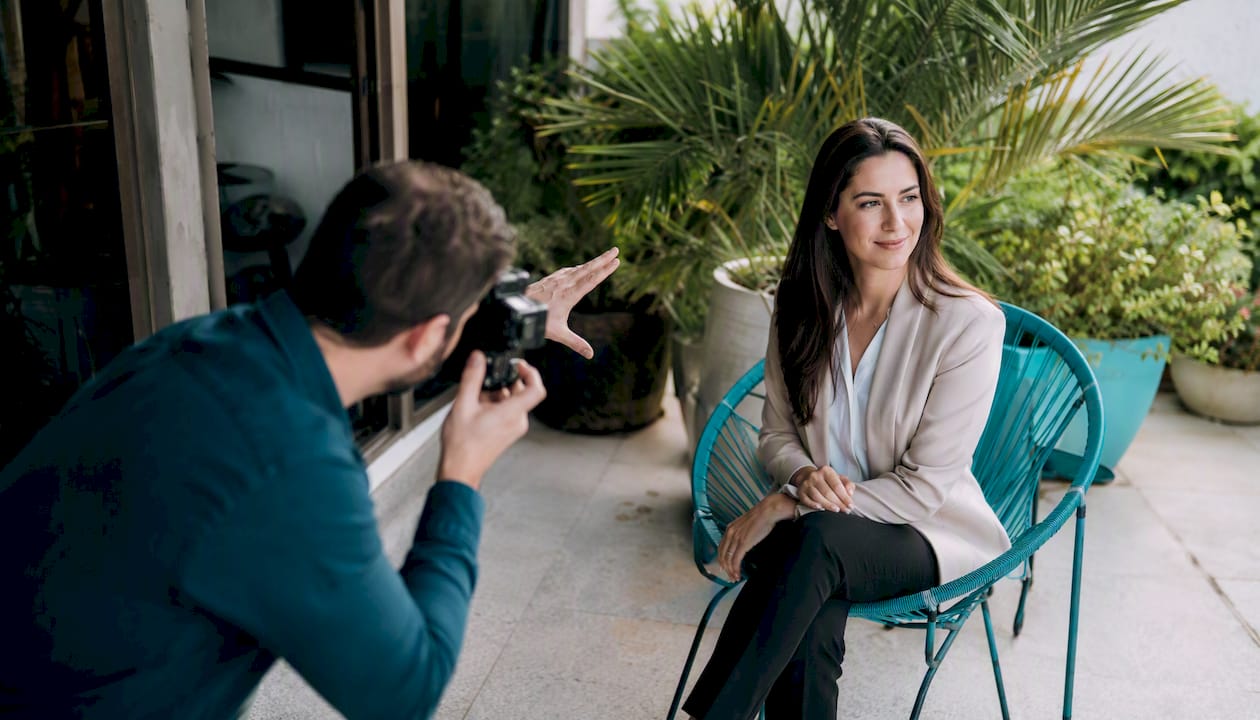
When a photographer spends the first 60 seconds of each session putting the subject at ease, asking a simple question, and giving one clear posing cue, the resulting frames look different. Not just technically better. More human. Employees who feel rushed or self-conscious produce tight, forced expressions that no amount of retouching fixes.
Consistent edits matter just as much as the shoot itself. A set of portraits where half the team has warm-toned skin and the other half looks cool and flat signals a lack of quality control, regardless of how good the individual shots are. Uniform retouching, applied with the same parameters across every portrait, is what makes a team page look like a team.
The calm tempo is something HR can support directly. A well-organized staging area, a point person who greets employees by name, and a schedule that does not feel rushed all contribute to the on-set atmosphere. The photographer controls the camera. You control everything around it.
JFPhotos brings professional headshots directly to your team
When you want consistent, polished portraits without managing every technical detail yourself, JFPhotos offers on-site corporate headshot services with a designated coordinator, matched lighting and background across every frame, and a fast gallery review process so HR is not chasing down approvals for weeks.
Every session includes uniform retouching, multiple delivery formats (web and print-ready), and clear turnaround timelines confirmed before the shoot date. JFPhotos has over a decade of experience running on-site sessions for teams of all sizes, and the operational approach described throughout this guide reflects how those sessions are structured.
Ready to book your team’s session? Visit the JFPhotos portrait photography page to review the portfolio and get in touch. For a full overview of available services, the JFPhotos services page covers every package option.
Sources
- ASMP
Recommended
Recent Posts